How to not do WebAssembly
Hey, long time no post. Today, I have something special for you.
For one upcoming project, I want to use C++/WebAssembly. However, it turns out that setting up the whole toolchain is a journey on its own, and it deserves its own separate article.
Tools
When it comes to the tools, I decided to go with Emscripten WebAssembly toolchain because of the limited experience I gained, while working on Hladikes/agh-wasm-clustering project. Moreover, it is the only low-level language I have some familiarity with.
For the web side of things, I opted for a vanilla TypeScript template provided
by Vite. I setted up the project by using a command npm init vite@latest.
WASM setup
If you want to use Emscripten SDK, you have two options. Installing the whole toolchain directly on your PC or using Emscripten Docker image and Docker volumes for compiling your binaries directly on your PC.
I went with the second option because I kind of didn't want to install (nor compile), all necessary libraries for compiling C++ to WASM. By using docker, I'm eliminating all of the possible issues related to the enviroment in which I'm compiling.
Here is a link for Emscripten SDK Docker image and here is the shell script which I'll use for compiling C++.
#!/bin/bash
docker run \
  --rm \
  -v $(pwd):/src \
  -u $(id -u):$(id -g) \
  emscripten/emsdk \
  em++ main.cpp -o main.wasm \
  -std=c++17 \
  --no-entry \
  -O3
Wait, did I say shell script ? And didn't I also say that I'm using Windows ?
Yes. That's why for using this script, I'll use WSL and this command
wsl ./compile.sh. Why ? Because life is too short to learn how to write proper
.bat / .cmd files.
As you might have noticed, for the output I used .wasm file extension instead
of .js. The reason for that is that I want to work directly with wasm instead
of using the JS glue code provided by Emscripten.
Okay, now that the setup is ready, let's set some expectations right from the start. Regarding JS/WASM, I want to be able to
- Call C++ methods from JavaScript
- Read/Write memory from both JavaScript and C++
- Call JavaScript methods from C++
- Use some parts of STD library
With all of the expectations being set, let the journey begin.
Goal 1: Call C++ methods from JavaScript
First, let's implement something simple - a sum function, which takes two numbers, sums them and returns the result.
#include <stdint.h>

extern "C" {
  uint32_t sum(uint32_t a, uint32_t b) {
    return a + b;
  }
};
Before compiling, we need to mention this function in a EXPORTED_FUNCTIONS
flag so that it can actually be accessible from the outside.
#!/bin/bash
docker run \
  --rm \
  -v $(pwd):/src \
  -u $(id -u):$(id -g) \
  emscripten/emsdk \
  em++ main.cpp -o main.wasm \
  -std=c++17 \
  --no-entry \
  -O3 \
  -s EXPORTED_FUNCTIONS='["_sum"]' # <- Underscore is needed
After compiling, we will obtain a main.wasm file that we can now use with JavaScript. For the sake of simplicity, I have kept both main.cpp, compile.sh, and main.wasm in a public folder within our initialized Vite project.
Now, let's write some TypeScript code to execute our wasm file.
WebAssembly.instantiateStreaming(fetch('main.wasm')).then((obj) => {
  const result = obj.instance.exports.sum(25, 44)
  console.log('result', result)
})
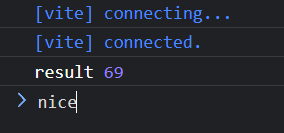
Let's start the dev server with npm run dev and check the dev console in the
browser.
Goal 2: Read/Write memory from both JavaScript and C++
For C++, let's make a very simple function which takes two parameters size and value which will be filled into an array, and which will return a pointer to the newly created array.
ℹ️ Don't forget to change the name of the exported function in the
EXPORTED_FUNCTIONS flag for the compilation.
#include <stdint.h>

extern "C" {
  uint32_t* fill(uint32_t size, uint32_t value) {
    uint32_t* arr = new uint32_t[size];

    for (uint32_t i = 0; i < size; i++) {
      arr[i] = value;
    }

    return arr;
  }
}
Now let's check the JS side of things.
WebAssembly.instantiateStreaming(fetch('main.wasm')).then((obj) => {
  const memory = new Uint32Array(obj.instance.exports.memory.buffer)
  const size = 10
  const value = 69
  const ptr = obj.instance.exports.fill(size, value)
  const memoryView = new Uint32Array(memory.buffer, ptr, size)

  console.log(memoryView)
})
After trying to run this, I got an error in the console:

It's a bit strange that we didn't get any errors in the previous code, but okay.
Looks like we need to provide/import some functionality to our wasm file.
Luckily for us, each wasm file (or at least its text format) contains all of the
necessary imports at the top of the file, so maybe checking .wat version of
the file might give us some hint.
There are tools for converting .wasm to .wat, but I'm just going to use the
WebAssembly extension for VSCode. By right-clicking on a wasm file, we are given
an option to Show WebAssembly
(module
  (type (;0;) (func (param i32)))
  (type (;1;) (func))
  (type (;2;) (func (result i32)))
  (type (;3;) (func (param i32) (result i32)))
  (type (;4;) (func (param i32 i32) (result i32)))
  (import "wasi_snapshot_preview1" "proc_exit" (func (;0;) (type 0)))
  (func (;1;) (type 1)
    nop)
  (func (;2;) (type 4) (param i32 i32) (result i32)
    (local i32 i32 i32 i32 i32 i32 i32 i32 i32 i32 i32 i32 i32 i32 i32 i32)
    i32.const 1
...
It looks like our newly compiled binary now requires wasi_snapshot_preview1
import namespace with a proc_exit method. Looks like Emscripten engine
evaluated based on our C++ implementation, that we need a wasi runtime with this
method. This type of error would certainly not happend if we'd use the glue code
provided by Emscripten, but here we are.
Let's try to do a little bit of hacking, and provide our wasm file this import.
const imports = {
  wasi_snapshot_preview1: {
    proc_exit: (...args: any[]) => console.log('proc_exit', args),
  },
}

WebAssembly.instantiateStreaming(fetch('main.wasm'), imports).then((obj) => {
  const memory = new Uint32Array(obj.instance.exports.memory.buffer)
  const size = 10
  const value = 69
  const ptr = obj.instance.exports.fill(size, value)
  const memoryView = new Uint32Array(memory.buffer, ptr, size)

  console.log(memoryView)
})
Let's run this again
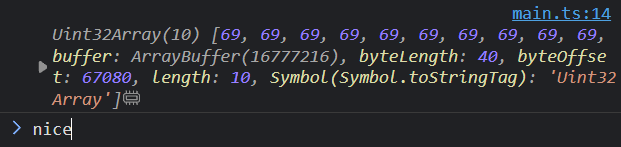
The assumption is that since we're working with a memory, either browser or our wasm binary needs some sort of a way to exit, if something goes wrong. Either way, this seems to be working. Maybe the hack we did will screw us later but for now, this is good.
So far we managed to write to the memory in C++ and read the memory from JS. But
what if we'll need to send some data from JS to C++. We could theoretically
write into the memory variable which reflects the stack memory in wasm. This
could work, however we might later run into the issue, where we will overwrite
pieces of memory, which are allocated by some other part of the program.
What we can do instead, is to make a very small API for us, to allocate and clear memory in C++ from JS.
#include <stdint.h>

extern "C" {
  uint32_t* alloc32(uint32_t size) {
    uint32_t* ptr = new uint32_t[size];
    return ptr;
  }

  void free32(uint32_t* ptr) {
    delete[] ptr;
  }

  uint32_t sum(uint32_t* ptr, uint32_t size) {
    uint32_t result = 0;

    for (uint32_t i = 0; i < size; i++) {
      result += ptr[i];
    }

    return result;
  }
}WebAssembly.instantiateStreaming(fetch('main.wasm'), imports).then((obj) => {
const memory = new Uint32Array(obj.instance.exports.memory.buffer)
const size = 23
const ptr = obj.instance.exports.alloc32(size)
const data = new Uint32Array(size).fill(3)
// Since the provided pointer is just a byte offset, we need to adjust
// it for our unsigned 32bit array
memory.set(data, ptr >> 2)
const result = obj.instance.exports.sum(ptr, size)
console.log('sum', result)
obj.instance.exports.free32(ptr)
})Now to moment we're all waiting for.
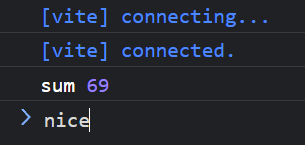
We can also try to verify, if our free function works like it should.
WebAssembly.instantiateStreaming(fetch('main.wasm'), imports).then((obj) => {
  const ptr1 = obj.instance.exports.alloc32(10)
  console.log(ptr1)
  obj.instance.exports.free32(ptr1)

  const ptr2 = obj.instance.exports.alloc32(10)
  console.log(ptr2)
  obj.instance.exports.free32(ptr2)
})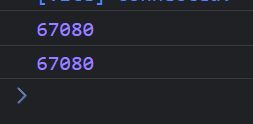
Okay we can see that the pointer is the same, let's see what will happend if we don't call the first free.
WebAssembly.instantiateStreaming(fetch('main.wasm'), imports).then((obj) => {
  const ptr1 = obj.instance.exports.alloc32(10)
  console.log(ptr1)
  // obj.instance.exports.free32(ptr1)

  const ptr2 = obj.instance.exports.alloc32(10)
  console.log(ptr2)
  obj.instance.exports.free32(ptr2)
})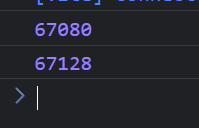
Perfect, it looks like the allocator works exactly like it should. Now let's go for the next challenge.
Goal 3: Call JavaScript methods from C++
Theoretically, we don't need this part since we will likely only call one method from JS and get its result synchronously. But who knows, maybe it'll become handy at some point, either in this project or another.
Let's begin by defining an extern function, which should be a reference to the
function we'll provide in a namespace.
#include <stdint.h>

extern "C" {
  extern void pong(uint32_t n);

  void ping(uint32_t n) {
    pong(n + 1);
  }
}
Let's compile this and check .wat output to see the imports structure.

Well, that's not good. Looks like the linker has problem, because we didn't provide any other code/library which could have this function.
After some digging on the internet, I found that I have to add flag
-s SIDE_MODULE=1, so let's try that.
(param i32)))
  (type (;1;) (func))
  (import "env" "pong" (func (;0;) (type 0)))
  (func (;1;) (type 1)
    nop)
  (func (;2;) (type 0) (param i32)
    local.get 0
    i32.const 1
    i32.add
    call 0)
  (export "__wasm_call_ctors" (func 1))
  (export "__wasm_apply_data_relocs" (func 1))
  (export "ping" (func 2)))
Everything compiled successfully. One interesting thing is that we no longer
need wasi_snapshot_preview1 interface for this to work, but I'll get to that
later. Either way, pretty neat! Now, let's implement a pong function on the JS
side of things.
const imports = {
  env: {
    pong(n: number) {
      console.log('pong', n)
    },
  },
}

WebAssembly.instantiateStreaming(fetch('main.wasm'), imports).then((obj) => {
  obj.instance.exports.ping(69)
})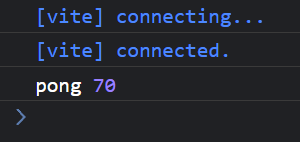
Nice. Now let's try to change our C++ code, so that we will use memory allocation.
#include <stdint.h>

extern "C" {
  extern void pong(uint32_t* arr, uint32_t size);

  void ping(uint32_t size, uint32_t value) {
    uint32_t* arr = new uint32_t[size];

    for (uint32_t i = 0; i < size; i++) {
      arr[i] = value + 1;
    }

    pong(arr, size);
  }
}
Let's check the output wasm.
(param i32 i32)))
  (type (;1;) (func (param i32) (result i32)))
  (type (;2;) (func))
  (import "env" "_Znam" (func (;0;) (type 1)))
  (import "env" "pong" (func (;1;) (type 0)))
  (import "env" "memory" (memory (;0;) 0))
  (func (;2;) (type 2)
    nop)
  (func (;3;) (type 0) (param i32 i32)
    (local i32 i32 i32 i32 i32 i32)
    i32.const -1
    local.get 0
    i32.const 2
...
Things are getting interesting. Even though we're using allocation in our
program, we no longer need to provide wasi_snapshot_preview1 interface.
Instead, we need to provide our pong function, some random "_Znam" function
and also our own memory ? Okay then, let's do a little bit of hacking again.
const imports = {
  env: {
    memory: new WebAssembly.Memory({
      initial: 10,
    }),
    _Znam: (...args: any[]) => console.log('_Znam', args),
    pong(ptr: number, size: number) {
      const view = new Uint32Array(imports.env.memory.buffer)
      console.log('pong', view.subarray(ptr, ptr + size))
    },
  },
}

WebAssembly.instantiateStreaming(fetch('main.wasm'), imports).then((obj) => {
  obj.instance.exports.ping(10, 69)
})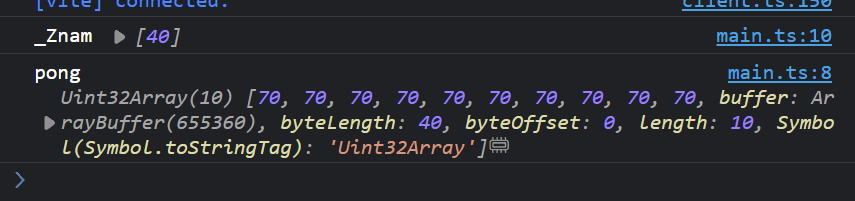
Although its working, I'm starting to be a bit confused about the way, Emscripten distinguishes what needs to be imported, and when.
From some observations, it looks like the _Znam function receives the number
of bytes which are being allocated and after some googling, I found
this answer
These functions are standard C++ library functions, in particular, operator new[](unsigned long) and operator new(unsigned long). They should be provided by your C++ runtime library. Depending on which compiler you're using this will be libsupc++ or libc++abi or libcxxrt.
... and this answer which sort of confirms what I thought.
@griffin2000 yes, but you're currently resolving your c++ runtime symbols (_Znam for example) in JavaScript, which is not what you'll want to do in the long run. I don't know that anyone has tried building libc++ (or whatever library will provide those symbols) for wasm yet, though.
Okay so if I want to use new operator, I need to provide a replacement _Znam
function which is probably in charge of dynamically allocating memory. I
probably also need a delete replacement right ? Let's try adding a delete
keyword in our C++ code, to see if we get some new import requirement.
(param i32 i32)))
  (type (;1;) (func (param i32) (result i32)))
  (type (;2;) (func (param i32)))
  (type (;3;) (func))
  (import "env" "_Znam" (func (;0;) (type 1)))
  (import "env" "pong" (func (;1;) (type 0)))
  (import "env" "_ZdaPv" (func (;2;) (type 2)))
  (import "env" "memory" (memory (;0;) 0))
  (func (;3;) (type 3)
    nop)
  (func (;4;) (type 0) (param i32 i32)
...
Well, turns out I was right. And instead of googling, I did what every developer in 2023 would do - I asked ChatGPT about this function. And well, I wasn't disappointed.
Yes, in both libc (C standard library) and libstdc++ (C++ standard library), the function _ZdaPv is related to memory management, specifically for deleting an array. Let's break down the function name:
_Z: This is a common prefix added to C++ function names in the Itanium C++ ABI (Application Binary Interface) used on many Unix-like systems, including Linux. It is used for name mangling, a process of encoding the function's signature (return type, function name, parameter types) into a mangled name.
d: This letter stands for "delete."
a: This letter stands for "array."
Pv: The letter P denotes a pointer, and v represents a "void" pointer. Therefore, Pv represents a pointer to void.
Right now, it looks like I need to write my own allocator, with allocating and
freeing memory. Based on the information I gained so far, I need to write a
alterantive to _Znam function which will allocate new resource, return a
pointer to that resource and _ZdaPv which will free that resource.
This is what I came up with. Not gonna lie, the fact that I'm writing barely working, low-budget allocator in JavaScript, for compiled C++ program, sounds a bit cursed. But its working, and at the end of the day, we're all just having fun here.
class Allocator {
  memory: WebAssembly.Memory
  lastPtr: number = 0

  constructor(size: number) {
    this.memory = new WebAssembly.Memory({
      initial: size,
    })
  }

  allocate(size: number) {
    this.lastPtr += size
    return this.lastPtr - size
  }

  free(ptr: number) {
    // TODO
  }
}

const allocator = new Allocator(10)
const imports = {
  env: {
    memory: allocator.memory,
    pong(ptr: number, size: number) {
      const view = new Uint32Array(imports.env.memory.buffer)
      console.log('pong', ptr >> 2, view.subarray(ptr >> 2, (ptr >> 2) + size))
    },
    _Znam(size: number) {
      const newPtr = allocator.allocate(size)
      return newPtr
    },
    _ZdaPv(ptr: number) {
      return allocator.free(ptr)
    },
  },
}

WebAssembly.instantiateStreaming(fetch('main.wasm'), imports).then((obj) => {
  obj.instance.exports.ping(10, 69)
  obj.instance.exports.ping(5, 10)
})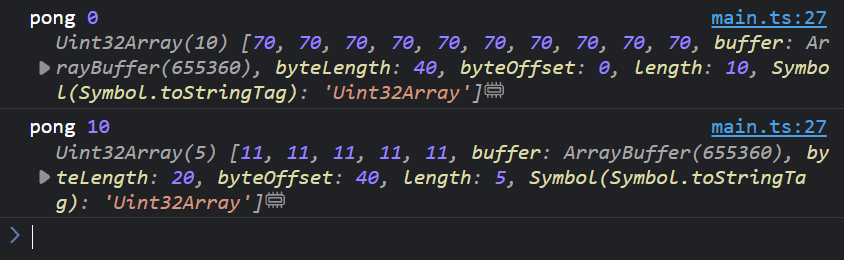
I consider this as a, win ? I guess so. Everything seems to be working, fairly
well. One thing which I find to be kind of weird, is that previously when using
new and delete, we only had to provide wasi_snapshot_preview1 interface,
without any custom allocation methods. And there is a good reason for that.
Remember how we used the -s SIDE_MODULE=1 flag ? Well from what I understood
by reading
Emscripten Documentation - Dynamic Linking,
this flag is essentially telling the compiler to compile our source code,
without caring about compiling its dependencies, since they will be available
later using dynamic linking.
This makes perfect sense, because before using this flag, we were able to
allocate and deallocate memory in our C++ code, without providing any external
function through the namespace. While right after adding it, we immediately had
to provide the _Znam and _ZdaPv functions. However, we needed to use this
flag so that we can write external functions. How can we overcome this "issue
and have our code compiled statically without linking our external functions
during compile time ?
After some digging in variety of GitHub issue pages and old forums, I stumbled
upon a new flag -s ERROR_ON_UNDEFINED_SYMBOLS=0. Although the name of the flag
is pretty self-explanatory, from what I understood, should tell the compiler not
to panic about parts, which can be linked statically.
Okay so let's verify that, and let's try the ping-pong example used earlier.
#include <stdint.h>

extern "C" {
  extern void pong(uint32_t* arr, uint32_t size);

  void ping(uint32_t size, uint32_t value) {
    uint32_t* arr = new uint32_t[size];

    for (uint32_t i = 0; i < size; i++) {
      arr[i] = value + 1;
    }

    pong(arr, size);
  }
}
Let's compile it first to see its .wat form.
(module
  (type (;0;) (func (param i32 i32)))
  (type (;1;) (func (param i32)))
  (type (;2;) (func))
  (type (;3;) (func (result i32)))
  (type (;4;) (func (param i32) (result i32)))
  (import "env" "pong" (func (;0;) (type 0)))
  (import "wasi_snapshot_preview1" "proc_exit" (func (;1;) (type 1)))
  (func (;2;) (type 2)
    nop)
  (func (;3;) (type 0) (param i32 i32)
    (local i32 i32 i32 i32 i32 i32 i32 i32 i32 i32 i32 i32 i32 i32 i32 i32)
    i32.const 1
    i32.const -1
...
Well, this looks way more promising than what we got previously. Not only we don't have to write our custom allocators, we also don't need to provide any memory to our binary. My guess is, that the allocators are now operating on a default stack memory. Anyway, let's write some JS code and run this.
const memory = {
  u32: new Uint32Array(),
}

const imports = {
  env: {
    pong(ptr: number, size: number) {
      console.log('pong', memory.u32.subarray(ptr >> 2, (ptr >> 2) + size))
    },
  },
  wasi_snapshot_preview1: {
    proc_exit: (...args: any[]) => console.log('proc_exit', args),
  },
}

WebAssembly.instantiateStreaming(fetch('main.wasm'), imports).then((obj) => {
  memory.u32 = new Uint32Array(obj.instance.exports.memory.buffer)
  obj.instance.exports.ping(10, 69)
})
This is wonderful, everything is working like expected and everything is much more clear to me about how things work under the hood (at least slightly 🤏)
Goal 4: Use some parts of STD library
Let's come up with some program, which will use everything we tried so far. Meaning that we will:
- Call functions on both ends (JS <=> C++)
- Read / Write / Allocate memory on both ends
- Use some data structures provided by STD library
The first thing which popped in my mind, is a program which can take a huge text
as a string, split it by an empty space to get words, store those words in a
std::vector<string> calculate the number of occurrences using a std::map.
Trigger warning ⚠️
for sake of trying as much things as we can, the
efficiency will not be our goal.
Here is the C++ side of things
#include <stdint.h>
#include <string>
#include <vector>
#include <map>

extern "C" {
  extern void return_output(const char* str, uint32_t size);

  // For giving us a piece of memory in which we can store our string
  char* alloc(uint32_t size) {
    return new char[size];
  }

  void analyse(char* ptr) {
    std::string str = ptr;
    std::string buffer;
    std::vector<std::string> words;

    // Split string by various delimiters
    for (const char c : str) {
      if (c == ' ' || c == ',' || c == '\n') {
        if (buffer.length() > 0) {
          words.push_back(buffer);
          buffer.clear();
        }
      } else {
        buffer += c;
      }
    }

    std::map<std::string, uint32_t> histogram;

    for (const std::string& word : words) {
      histogram[word]++;
    }

    std::string out_json;
    out_json += '{';

    for (const auto& [word, count] : histogram) {
      out_json += "\"" + word + "\": " + std::to_string(count) + ",";
    }

    out_json.pop_back();
    out_json += '}';

    return_output(out_json.c_str(), out_json.length());
  }
}
... and here is the JS side of things
// Since we are only working with characters, we can
// just work with the 8-bit memory view
const memory = {
  u8: new Uint8Array(),
}

const imports = {
  env: {
    return_output(ptr: number, size: number) {
      const decoder = new TextDecoder()
      const output = memory.u8.subarray(ptr, ptr + size)
      const decodedOutput = decoder.decode(output)
      const result = JSON.parse(decodedOutput)

      console.table(result)
    },
  },
  wasi_snapshot_preview1: {
    proc_exit: (...args: any[]) => console.log('proc_exit', args),
  },
}

WebAssembly.instantiateStreaming(fetch('main.wasm'), imports).then((obj) => {
  memory.u8 = new Uint8Array(obj.instance.exports.memory.buffer)

  const str =
    'this this text is very is very is very is very repetitive, yeah it is'
  const size = str.length

  const ptr = obj.instance.exports.alloc(size)
  const encoder = new TextEncoder()
  const encodedStr = encoder.encode(str)

  memory.u8.set(encodedStr, ptr)

  obj.instance.exports.analyse(ptr)
})
And here is our beloved result

I consider this as a huge win since everything worked on a first try. And yeah, I'm talking about our last program, not the whole journey.
Conclusion
After all, maybe there is a reason why Emscripten ships its own glue code. I'm joking, of course. I'm quite impressed by how many things the dev team behind Emscripten had to think about. For example the whole mechanism for detecting all the necessary dependencies and a JavaScript code that can emulate numerous low-level functions and instructions. Of course, by writing our simple programs, we made our conditions much easier. Even occasionally writing allocation functions was fairly straightforward. However, I can't imagine porting something considerably bigger, like a game or some other tool, without using the glue code.
On the other hand, if you know what you're doing, having full control might be more beneficial and could lead you to more performant and smaller code.
Honorable mentions
I would really like to thank Tsoding Daily and Surma for providing an exceptional WASM-related content on the internet. I wish I stumbled upon their content before struggling for countless hours:)
The whole project can be found in the Hladikes/wasm-cpp-fun repository.